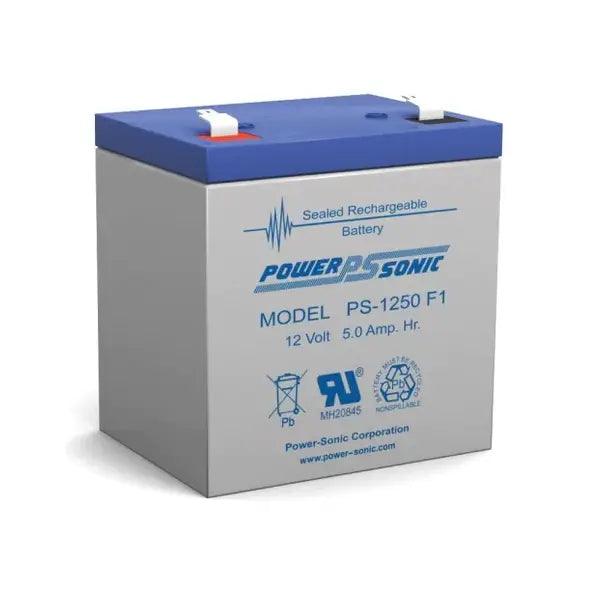
Alarm Battery 12VDC 5 Amp, PS-1250
Alarm System backup battery, 12 volt DC, 5 amp suitable for Hills Reliance Security alarm systems.
Model: PS-1250
Backup power supply battery features, absorbent Glass Mat (AGM) technology for superior performance • Valve regulated, spill proof construction allows safe operation in any position • Power/volume ratio yielding unrivaled energy density • Rugged impact resistant ABS case and cover(UL94-HB) • Approved for transport by air. D.O.T., I.A.T.A., F.A.A. and C.A.B. certified • U.L. recognized under file number MH 20845
Shop CTC for best deals on Hills Reliance Security products.
6 Easy Steps to change a security alarm battery
Step 1
Turn off the electrical supply to your system.
Step 2
If your alarm system is monitored, contact the control room to let them know you are going to change the backup battery. This will prevent the control room sending a patrol company to your premises.
Step 3
Locate the alarm system battery in the control panel. Typically the alarm system battery will be installed in a walk-in robe, cupboard or even a spare bedroom wardrobe.
Step 4
Open the control panel box. You can usually do this with a control panel key (sometimes left on top of the control box), or you may need to unscrew the cover. When you open the cover, your alarm may go off. Make sure you have your code on hand to turn off your system if this occurs.
Step 5
Disconnect the battery. Remove both the black and red wires from the battery terminals. You should be able to do so gently by hand, or you may prefer to use pliers. (To avoid receiving a shock, make sure you do not touch the battery terminals or open-end of the wire connectors with any metal implement.)
Once disconnected, remove the old battery and dispose of it responsibly.
Step 6
Connect the new battery, making sure you are using a battery of the same size and voltage as the original. Start by removing any plastic protectors from the new battery, then connect the wires.
Ensure the battery is not put in backwards—the printed information should be facing towards you. Insert the RED wire in the RED battery terminal, and the BLACK wire in the BLACK. Ensure the connectors are tightly connected to the battery terminals. If you have a multimeter, use it to check that the battery is charging. Close the control panel and lock.
Original: $33.00
-65%$33.00
$11.55Product Information
Product Information
Shipping & Returns
Shipping & Returns
Description
Alarm System backup battery, 12 volt DC, 5 amp suitable for Hills Reliance Security alarm systems.
Model: PS-1250
Backup power supply battery features, absorbent Glass Mat (AGM) technology for superior performance • Valve regulated, spill proof construction allows safe operation in any position • Power/volume ratio yielding unrivaled energy density • Rugged impact resistant ABS case and cover(UL94-HB) • Approved for transport by air. D.O.T., I.A.T.A., F.A.A. and C.A.B. certified • U.L. recognized under file number MH 20845
Shop CTC for best deals on Hills Reliance Security products.
6 Easy Steps to change a security alarm battery
Step 1
Turn off the electrical supply to your system.
Step 2
If your alarm system is monitored, contact the control room to let them know you are going to change the backup battery. This will prevent the control room sending a patrol company to your premises.
Step 3
Locate the alarm system battery in the control panel. Typically the alarm system battery will be installed in a walk-in robe, cupboard or even a spare bedroom wardrobe.
Step 4
Open the control panel box. You can usually do this with a control panel key (sometimes left on top of the control box), or you may need to unscrew the cover. When you open the cover, your alarm may go off. Make sure you have your code on hand to turn off your system if this occurs.
Step 5
Disconnect the battery. Remove both the black and red wires from the battery terminals. You should be able to do so gently by hand, or you may prefer to use pliers. (To avoid receiving a shock, make sure you do not touch the battery terminals or open-end of the wire connectors with any metal implement.)
Once disconnected, remove the old battery and dispose of it responsibly.
Step 6
Connect the new battery, making sure you are using a battery of the same size and voltage as the original. Start by removing any plastic protectors from the new battery, then connect the wires.
Ensure the battery is not put in backwards—the printed information should be facing towards you. Insert the RED wire in the RED battery terminal, and the BLACK wire in the BLACK. Ensure the connectors are tightly connected to the battery terminals. If you have a multimeter, use it to check that the battery is charging. Close the control panel and lock.